
The barrier to generating words has dropped to zero. Anyone with an internet connection can produce thousands of words of AI content writing in seconds. Yet, despite this massive increase in volume, the amount of truly engaging, high-converting content on social media remains surprisingly low.
Why? Because generating words is not the same as communicating value. When everyone has access to the same language models, the competitive advantage shifts from the ability to write to the ability to structure and format.
In this guide, we will explore advanced AI content writing techniques designed specifically for social media. We will break down the crucial difference between writing and strategy, dissect the four pillars of a perfect post (Hooks, Structure, Copy, CTA), and reveal how to smoothly transform your text into the most powerful visual format: the carousel.
Write from evidence, not an empty prompt Give the model audience context, source material, examples, and constraints before asking it to shape the hook, body, slide copy, and CTA.
AI Writing vs. Content Strategy
The most common mistake creators make is expecting artificial intelligence to replace their content strategy. It cannot.
If you ask an AI to "write a viral post about marketing," you are asking the construction crew to build a house without a blueprint. You will get a generic, uninhabitable structure. Your job is to provide the strategy; the AI's job is to execute the formatting.
The Problem with Generic AI Copy
Before we dive into solutions, we must identify the enemy: generic AI writing. Readers have developed an immune response to specific phrases and structural patterns.
Generic AI content writing happens when the human input is lazy. If you provide a generic prompt, you receive a generic output.
Symptoms of Generic AI Writing:
To avoid these traps, you must stop treating AI as a creative genius and start treating it as a highly capable assistant that requires strict, unambiguous instructions.
The Four Pillars of Social Media Copy
When using AI content writing tools for platforms like LinkedIn or Instagram, you must prompt the AI to focus on four distinct elements. A failure in any one of these pillars will collapse the entire post.
1. The Hook
The hook is the most critical element of your copy. If the first sentence (or the cover slide of your carousel) doesn't grab attention immediately, the rest of your optimally written content will be ignored.
How to prompt for Hooks: Do not ask for one hook. Ask for twenty. Prompt Example: "I am writing a post about why cold emailing is dead. Generate 10 different hooks for LinkedIn. Use the 'curiosity gap' framework for 5 of them, and the 'contrarian opinion' framework for the other 5. Keep them under 15 words each."
2. The Structure
Social media users do not read; they scan. Your AI writing must be highly structured to accommodate short attention spans.
How to prompt for Structure: Use established copywriting frameworks like PAS (Problem, Agitation, Solution) or AIDA (Attention, Interest, Desire, Action). Prompt Example: "Take this raw data about our new software feature and structure it using the PAS framework. Ensure the 'Problem' section is relatable to B2B sales managers."
3. The Slide Copy (Conciseness)
If you are planning to turn your text into a visual format (which you should), your copy needs to be incredibly concise. A paragraph that looks fine in a Word document will look like an unreadable wall of text on a mobile screen.
How to prompt for Slide Copy: Enforce strict character or word limits. Prompt Example: "Rewrite this 500-word article into 7 distinct points. Each point will be a slide in an Instagram carousel. You must strictly limit the text for each point to a maximum of 25 words."
4. The Call to Action (CTA)
Every piece of content must have a job. What do you want the reader to do after consuming your post? Comment? Save? Click a link?
How to prompt for CTAs: Be specific about the desired action and the incentive. Prompt Example: "Generate a strong CTA for the final slide. The goal is to get people to download a free PDF guide. Focus on the immediate value they will get by clicking the link in the comments."
When AI Writing Should Become a Carousel
Even with perfect hooks, structure, and conciseness, text alone has limitations. On visually-driven platforms like Instagram, and increasingly on professional networks like LinkedIn, plain text posts struggle to compete with interactive formats.
You should transition your AI writing from a text post into a visual carousel when your content involves:
Carousels can organise a multi-part explanation into readable steps. They do not force interaction or guarantee a distribution boost; check whether the sequence actually helps your audience.
Bridging the Gap: From Text to Visual Design
This brings us to the biggest bottleneck in the modern content creation workflow.
You have mastered AI content writing. You have generated a brilliant, concise, optimally structured script for a 10-slide carousel. Now what?
Traditionally, the next step involves opening a graphic design tool like Figma or Canva. You select a template, and then the tedious work begins: copying the hook and pasting it into slide 1. Copying point one and pasting it into slide 2. Adjusting the font size because the text is too long. Re-aligning the margins.
While tools like Canva and Figma are powerful for custom design, they are not optimized for rapid, automated content production based on text. They require significant manual effort to bridge the gap between your AI-generated script and the final visual asset.
Turn Reviewed Copy into a GoToFlow Carousel
To reduce manual design friction, use an end-to-end platform like GoToFlow for the full carousel workflow.
GoToFlow is designed specifically to solve the text-to-design bottleneck. Instead of managing your AI writing in one tab and your design templates in another, GoToFlow integrates the entire process:
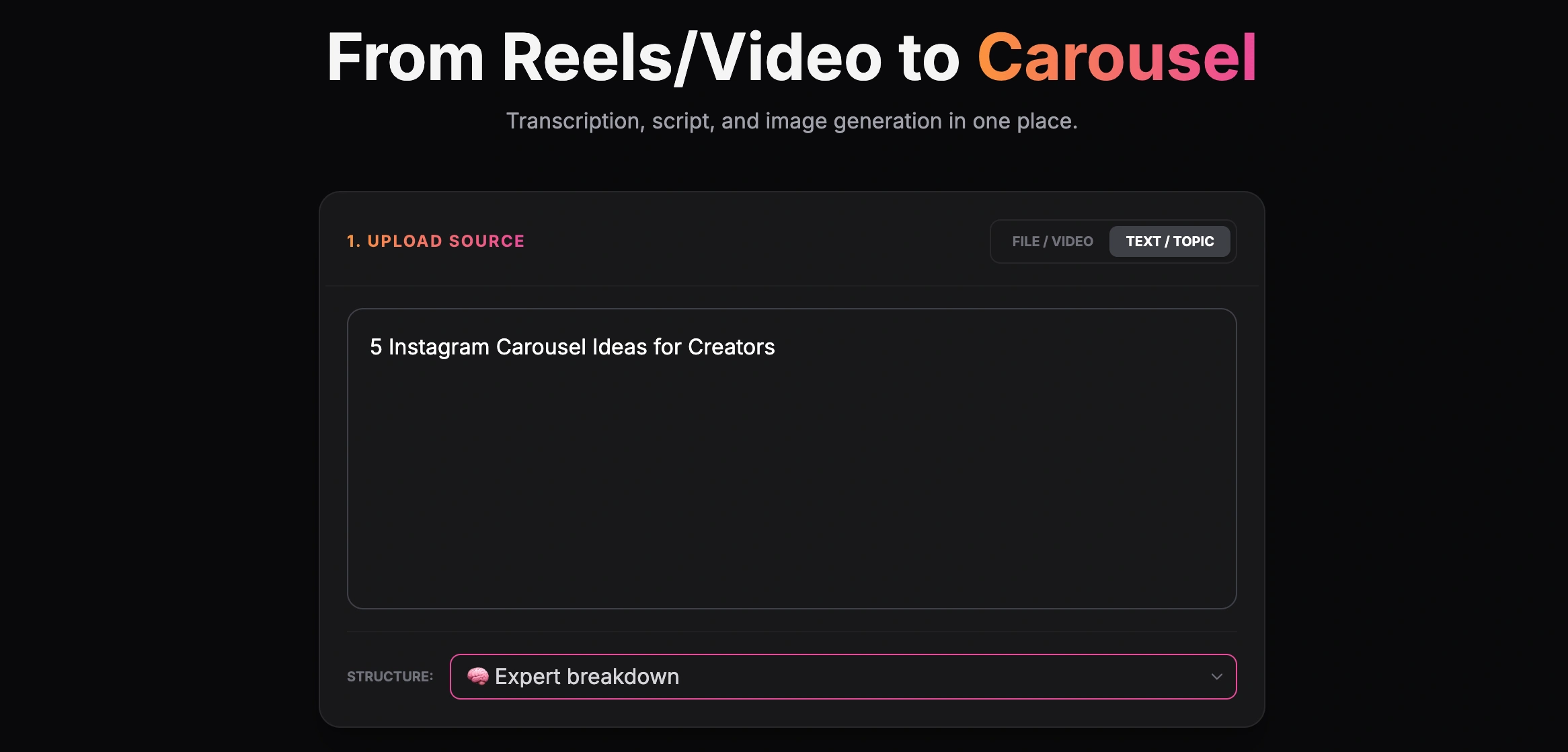
Creating a carousel from a text topic
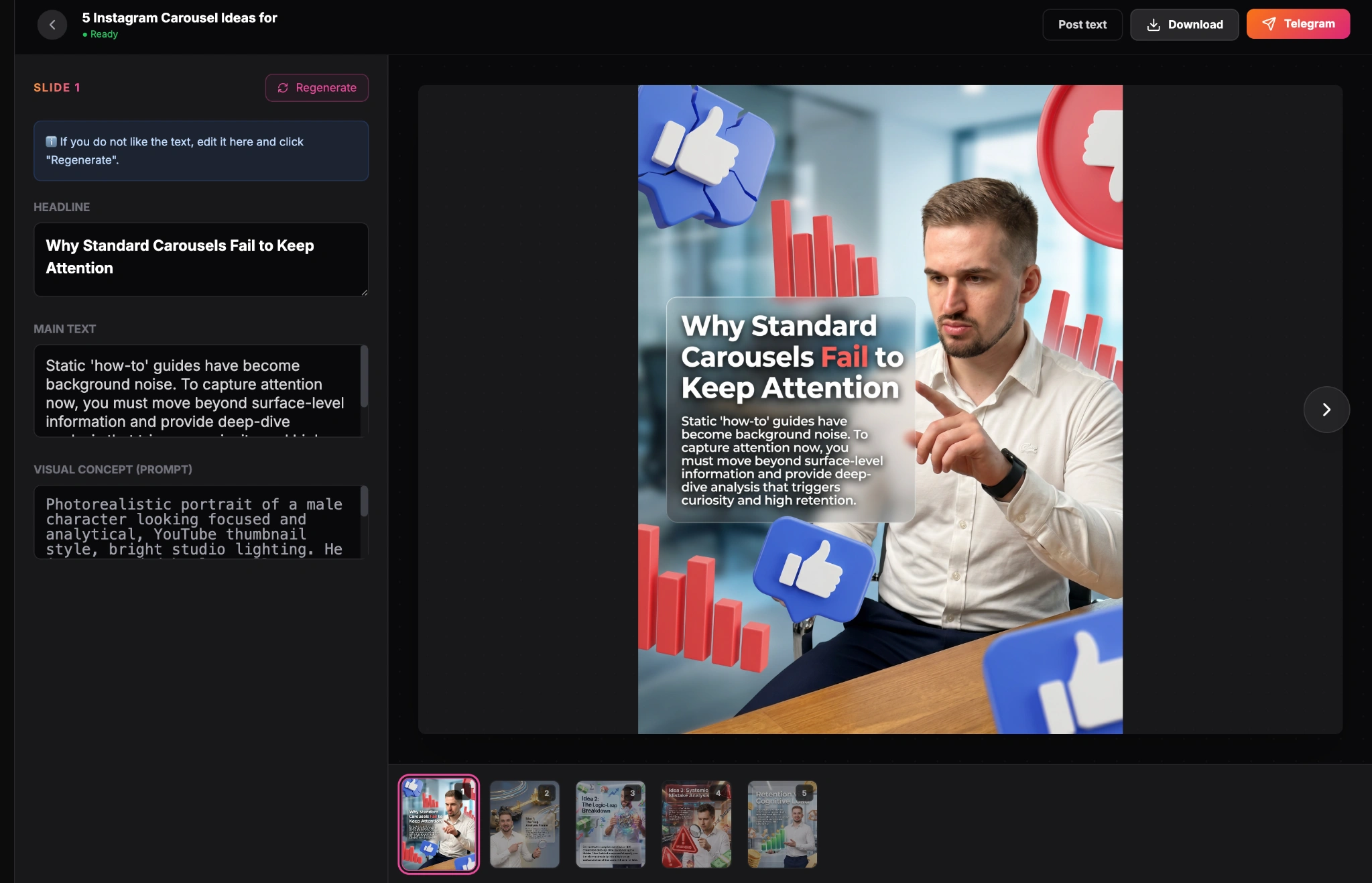
Finished carousel result inside the GoToFlow editor
By utilizing a dedicated carousel generator, you transform AI content writing from a simple text-generation exercise into a complete, automated production pipeline. You spend your time on the high-value tasks—strategy, insights, and engaging with your audience—while the platform handles the execution and formatting.
The Hidden Role of Formatting in AI Writing
When discussing AI content writing, most of the conversation focuses on the words themselves—the vocabulary, the syntax, and the tone. However, the unsung hero of social media engagement is formatting.
You can have the most profound insight in your industry, but if it is presented as a dense, 400-word paragraph, no one will read it. Social media consumption is rapid and visual.
Breaking Down the Wall of Text
Effective AI content writing must include explicit instructions for formatting. When prompting your AI, you need to demand white space.
Instead of just asking for a summary, prompt the AI: "Write a summary of this concept. Use short sentences. Ensure no paragraph is longer than three lines. Use bullet points for the key takeaways."
This forces the AI to construct the text in a way that is immediately accessible to a scrolling user. This formatting is precisely why carousels have become so dominant. A carousel forces a strict structure onto your writing. It mandates that you distill your thoughts into distinct, manageable slides.
The Synergy of Text and Design
The ultimate goal of AI content writing is not just to produce good text; it is to produce text that smoothly integrates with visual design. A strong headline only works if it is the focal point of the first slide. A bulleted list only works if the graphic design supports its hierarchy.
By focusing on structure and utilizing end-to-end platforms that bridge the gap between copy and design, you elevate your content from a basic text output into a compelling, professional asset that captures attention and drives real engagement.