
Why Instagram carousels matter for your brand
Creating consistent, high-quality content is the biggest bottleneck for creators, coaches, and small business owners on Instagram. While Reels are excellent for reaching new audiences, carousels are often one of the strongest formats for saves, shares, and deeper engagement. They allow you to dive deeper into a topic, showcase a transformation, or explain a complex service without overwhelming the reader.
However, writing a cohesive 10-slide carousel from scratch takes time. You need a strong hook, a logical flow, concise bullet points, and a compelling call to action. This is where AI prompting becomes your most valuable asset.
Why Instagram carousel prompts work
Using a general AI chat tool can dramatically reduce your content creation time, but only if you know how to prompt it correctly.
A generic prompt like "Write an Instagram carousel about marketing" will yield a robotic, unreadable wall of text. The AI will use words like "delve" and "realm" and provide advice that everyone has heard a thousand times.
A highly structured prompt acts as a blueprint. It helps the AI follow your brand voice, respect character limits for mobile reading, and use frameworks that keep the carousel focused. The ready-to-use prompts below reduce guesswork and produce stronger first versions for review.
How to use these prompts properly
To get the best results from the prompts in this library, keep these fundamental rules in mind:
[INSERT TOPIC], do not just write "fitness". Write "how busy professionals can stay fit working 50 hours a week". The more specific your input, the better the output.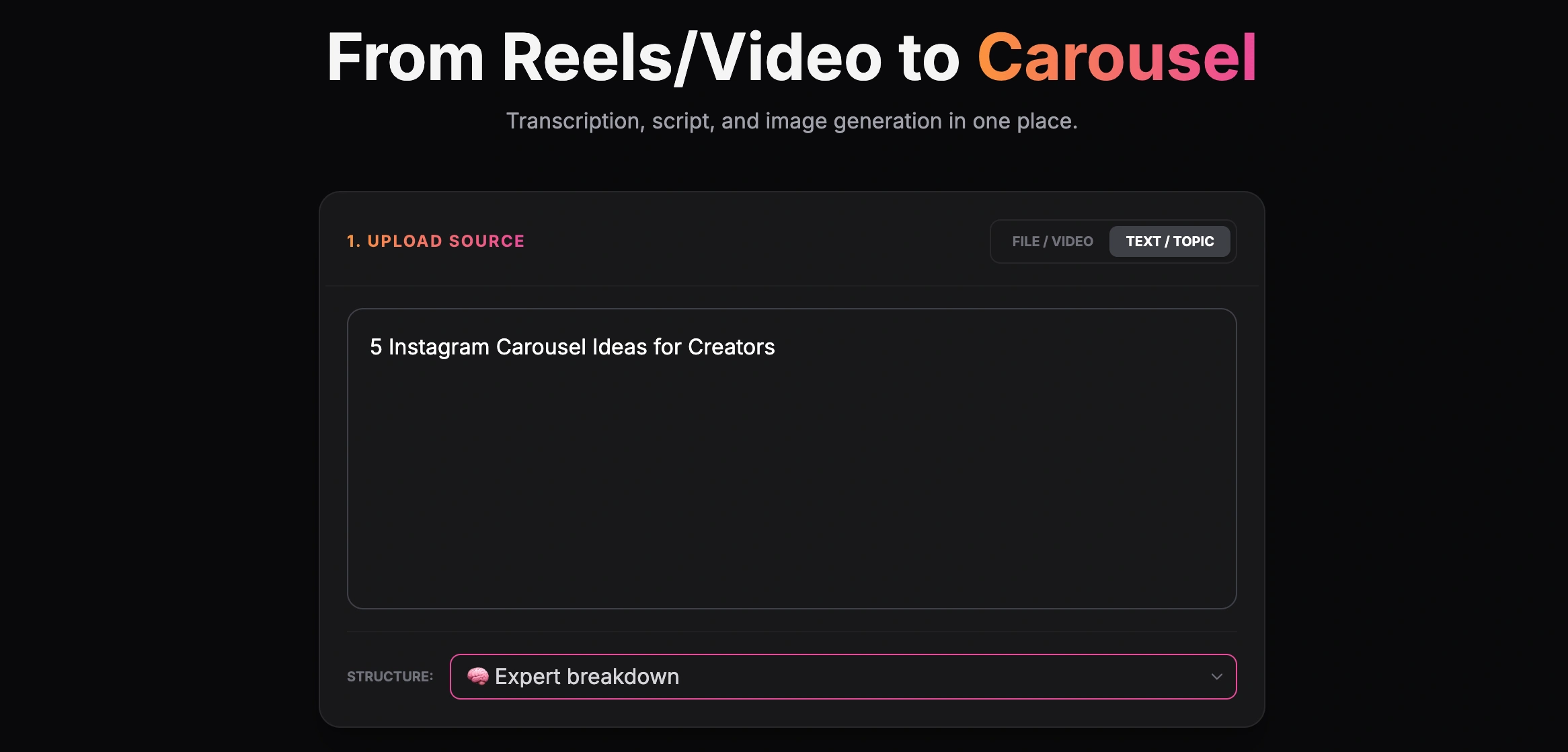
Creating a carousel from a text topic
Prompt Groups
Use these categorized prompts to generate specific types of carousels tailored to your audience and business goals.
1. Educational carousel prompts
Educational carousels are designed to teach your audience a specific skill, solve a problem, or explain a complex concept simply. They are highly saveable.
[YOUR NICHE]. Write a 7-slide Instagram carousel breaking down [COMPLEX TOPIC]. Slide 1 must be a strong hook addressing a common frustration. Slides 2-5 should explain the concept using an analogy. Slide 6 is the summary. Slide 7 is a CTA asking followers to save the post. Keep text under 25 words per slide."[TOPIC]'. Dedicate 2 slides to debunking each myth. Use a provocative, conversational tone. Keep paragraphs to a maximum of 2 sentences per slide."[ACHIEVING SPECIFIC RESULT]. Structure it into a 9-slide carousel. Use short, punchy bullet points. Include 'Pro Tip' sections on slides 4 and 6. Make the tone highly actionable and encouraging."[BOOK/PODCAST/FRAMEWORK] into a 6-slide Instagram carousel for [TARGET AUDIENCE]. Focus only on the 3 most practical takeaways. Do not use generic filler words."2. Storytelling carousel prompts
Storytelling builds connection. These carousels share your journey, failures, and lessons learned.
[GOAL]. Slide 1: The embarrassing reality. Slides 2-4: What went wrong. Slides 5-8: The 3 pivotal lessons I learned. Slide 9: Where I am now. Slide 10: Ask the audience if they have experienced something similar."[STATE A] to [STATE B] in [TIMEFRAME]'. Use a humble, reflective tone. Focus on the emotional shift, not just the tactical steps. Keep sentences very short."[INSERT ROUGH NOTES] into a compelling 7-slide carousel narrative. Build tension in the first 3 slides and deliver the resolution in slide 5. Keep the vocabulary simple and relatable."[YOUR PROFESSION]. Instead of making it glamorous, highlight the unglamorous, realistic struggles. Make it 6 slides long with a humorous, self-deprecating tone."3. Trust-building carousel prompts
Trust-building content establishes your authority by sharing unique perspectives, industry truths, or client results.
[INDUSTRY/NICHE]. Slide 1: State the popular belief. Slide 2: Why it is wrong. Slides 3-6: My alternative approach. Slide 7: The result of my approach. Be confident but not arrogant."[INSERT DETAILS] into a 7-slide carousel. Focus on the specific obstacles the client faced and the exact framework we used to overcome them. Emphasize data and concrete outcomes."[YOUR PRODUCT/SERVICE]'. Explain our rigorous quality process or unique methodology. Make the reader feel like they are getting insider access."[NICHE]. Be direct, avoid sugar-coating, and use a tough-love tone. Slide 9 must direct them to a free resource in the link in bio."4. Offer / sales carousel prompts
Sales carousels should agitate a problem and position your product or service as the logical solution without being overly aggressive.
[SERVICE NAME]. Slide 1: Agitate the core problem my audience faces. Slides 2-4: Why traditional solutions fail. Slide 5: Introduce my service. Slides 6-7: List 3 key benefits. Slide 8: Clear CTA on how to buy or book a call."[YOUR PRODUCT]. The objections are: [INSERT OBJECTIONS]. Address each objection logically and empathetically over 2 slides."[PROBLEM] today? Build urgency without using scammy or aggressive marketing jargon. Slide 6 is a CTA to DM a specific keyword."[PRODUCT]. Do not list features. Instead, translate every feature into a specific emotional benefit for the user. Keep it under 20 words per slide."5. Personal brand carousel prompts
Personal branding is about sharing your values, routines, and philosophies to attract a like-minded audience.
[YOUR ROLE]. Make them unconventional habits, not just 'wake up early and drink water'. Keep it personal and highly specific."[YOUR NICHE]. Give one slide to each tool, explaining specifically how it saves me time or money."[INSERT QUESTION]. Provide a definitive, no-nonsense answer. Use a friendly, mentoring tone."6. Small business carousel prompts
Small businesses can use carousels to showcase expertise, highlight their team, and answer customer questions.
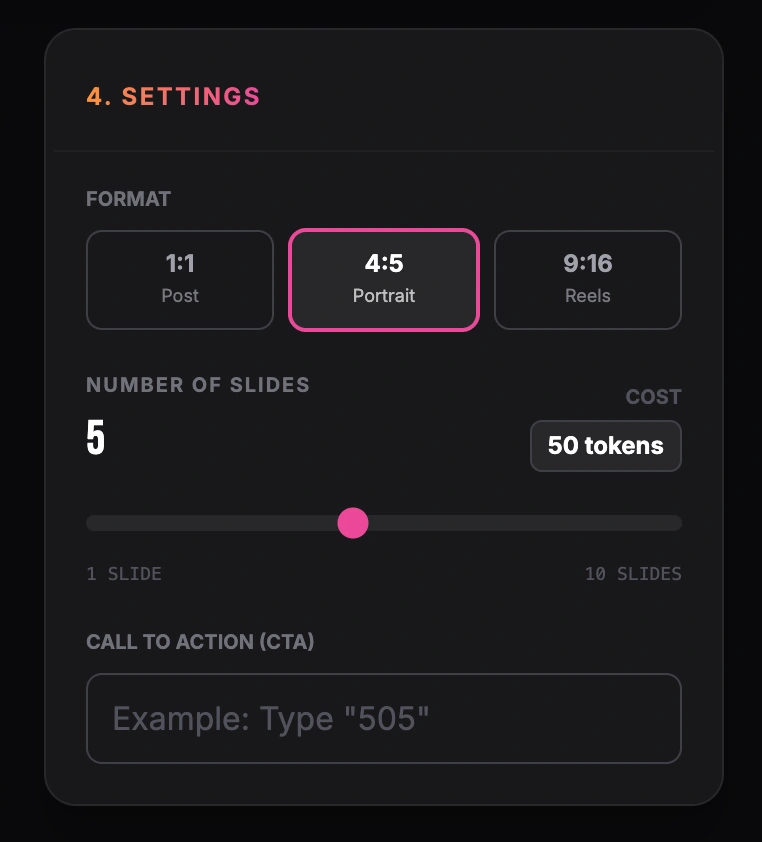
Setting format, number of slides and call to action
[BUSINESS TYPE]). Share '5 Things Your [PROFESSION, e.g., Plumber/Accountant] Wishes You Knew'. Make it educational, slightly humorous, and highly practical."[PRODUCT/SERVICE]. Explain the 3 factors customers must consider before making a purchase. Position our business as the trusted advisor."[TOPIC]. Keep the answers extremely concise and jargon-free."7. Before / after carousel prompts
Transformations are highly visual and incredibly compelling for driving conversions.
[TASK]. Use contrast to make the old way look exhausting and the new way look effortless. Keep it under 15 words per slide."[CLIENT TYPES]'. Contrast one person who ignored the problem with another who used our framework. Highlight the compounding results over time."[CLIENT NAME]. Show the progression from week 1 to week 4. Focus on momentum and execution."8. Repurposing prompts
Turn your existing long-form content into quick Instagram posts.
[INSERT TEXT] and condense it into a 7-slide Instagram carousel. Extract only the 3 most actionable points. Write a new, punchy hook for slide 1. Keep the tone identical to the original text."[INSERT TRANSCRIPT] into an 8-slide carousel. Focus entirely on the framework mentioned in the middle of the video. Ignore the intro and outro fluff."[INSERT POST]. Repurpose it into a highly visual, 6-slide Instagram carousel. Break the long paragraphs into short, one-sentence punchlines."[INSERT TEXT] and turn it into a 10-slide carousel. Only use the top 5 items from the list. Give each item 1 dedicated slide with a brief explanation."Want the full creation process? Read AI Instagram Carousel Generator.
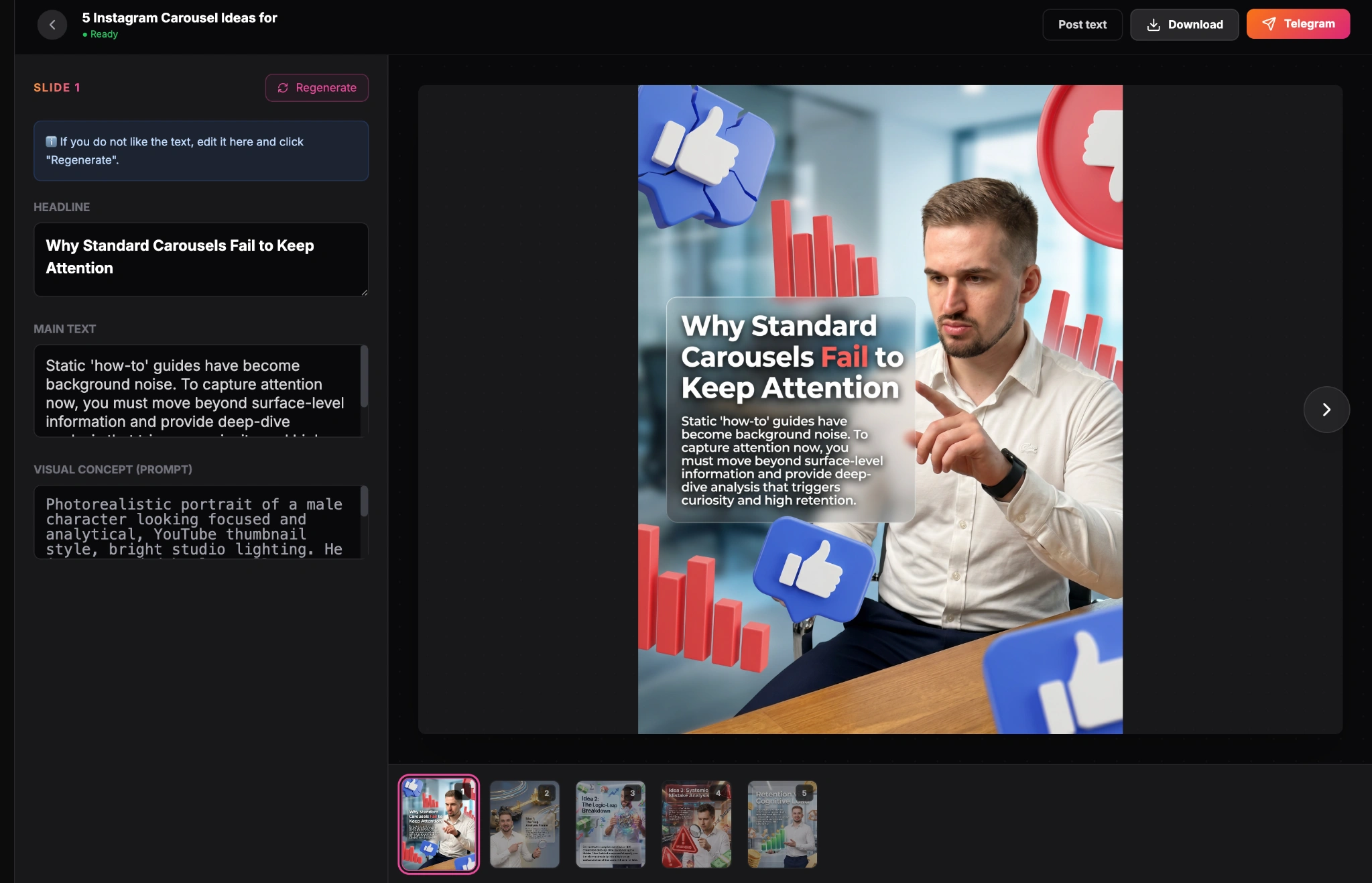
Finished carousel result inside the GoToFlow editor
Common mistakes when using carousel prompts
Even with the best prompts, you can ruin a carousel during the execution phase. Avoid these critical errors:
1. Overstuffing slides with text
If a slide takes more than 3 seconds to read, the user will swipe away. Never accept an AI output that gives you heavy paragraphs. Edit it down to bullet points and short sentences.
2. Using generic hooks
"Here are 5 marketing tips" is not a hook. A stronger hook creates a clear curiosity gap on slide one.
3. Forgetting the narrative flow
A carousel is not just a PowerPoint presentation; it is a story. Use transitional phrases at the end of slides to encourage the user to swipe to the next one.
4. Failing to tell them what to do next
An educational carousel without a CTA is a wasted opportunity. Ask the reader to save the post, comment a keyword, or visit your link in bio.
Conclusion
Instagram carousels are unmatched for building authority, educating your audience, and driving deep engagement. However, writing them manually can quickly lead to burnout. By utilizing highly structured AI prompts, you can establish a repeatable content engine that produces premium carousel results in minutes, not hours. Pick one prompt from the library above, insert your specific niche context, and start filling your content calendar today.