
GoToFlow AI social media content generator logo
GoToFlow
HomeBlogInstagram Carousel Ideas for Creators and Brands

Instagram Carousel Ideas for Creators and Brands

Discover high-converting Instagram carousel ideas. Learn repeatable formats to overcome creator's block and keep your content schedule full.

ExamplesUpdated: Last reviewed:

Updated:

Last reviewed:

What you need to know

  • The best Instagram carousel ideas rely on proven formats: educational step-by-steps, mistake breakdowns, myth vs. reality, and behind-the-scenes insights.
  • Instead of reinventing the wheel for every post, creators should use template-based ideas that can be adapted to any niche.
  • Start with just a topic or idea: GoToFlow automatically creates the structure, copy, and design of a finished carousel in a couple of minutes.

One of the biggest bottlenecks for creators and social media managers is staring at a blank screen, wondering what to post next.

While Instagram carousels are incredibly effective for growth, coming up with fresh, engaging Instagram carousel ideas every week can quickly lead to creator burnout.

The secret to a consistent content schedule isn't endless creativity—it's relying on proven frameworks. In this article, we will share repeatable carousel ideas that work for any niche.

Top 4 Repeatable Carousel Frameworks

Instead of trying to be purely original every time, use these structured formats. You can plug different topics into these frameworks indefinitely.

Here are 15 illustrative carousel title ideas grouped by their purpose. Adapt them to your niche and available sources before placing them in a content calendar; they are not tested performance results.

1. Educational & How-to

Teach your audience how to solve one specific problem. People save these posts to refer back to them later.

"How to [achieve desired result] in just 3 simple steps" (e.g., How to optimize your Instagram bio in 3 simple steps)
"The ultimate beginner's guide to [topic]" (e.g., The ultimate beginner's guide to meal prepping)
"How I went from [struggle] to [success] in 6 months" (e.g., How I went from 0 to 10k followers in 6 months)
"A simple checklist for your next [event/project]" (e.g., A simple checklist for your next website launch)

2. Mistakes & Pitfalls

Fear of doing something wrong is a powerful hook. List common mistakes and explain how to fix them.

"3 silent mistakes ruining your [goal]" (e.g., 3 silent mistakes ruining your SEO rankings)
"Stop doing [common action] if you want to [achieve result]" (e.g., Stop skipping breakfast if you want to build muscle)
"Why your [strategy] isn't working (and how to fix it)" (e.g., Why your cold emails aren't working (and how to fix it))
"The biggest trap beginners fall into when starting [skill]" (e.g., The biggest trap beginners fall into when starting photography)

3. Myths vs. Reality & Contrarian

Challenge a widely held belief in your industry. This positions you as an authority and encourages debate.

"3 lies you've been told about [topic]" (e.g., 3 lies you've been told about the algorithm)
"Why [popular trend] is actually a bad idea" (e.g., Why hustle culture is actually a bad idea)
"What people think [job/skill] is like vs. What it actually is" (e.g., What people think freelancing is like vs. What it actually is)

4. Tools, Resources & Listicles

Share curated lists. These are highly shareable and provide immediate value.

"5 free tools I use every day to [achieve result]" (e.g., 5 free tools I use every day to save time)
"The only 3 books you need to read to master [skill]" (e.g., The only 3 books you need to read to master sales)
"My top 4 favorite resources for [topic]" (e.g., My top 4 favorite resources for learning Python)
"Steal my exact workflow for [task]" (e.g., Steal my exact workflow for writing blog posts)

How to Never Run Out of Ideas

Why this matters

Listen to your audience The best content ideas already exist in your DMs, comments section, and client onboarding calls. Every question you get asked more than once should become a carousel.

If you are still stuck, you can use AI to brainstorm. A simple prompt like "What are the top 5 struggles for beginners in [Your Niche]?" can generate months worth of content ideas.

Turning Ideas into Content

Choosing an idea is the starting point, not the finished post. The real challenge is turning that concept into a structured, well-designed carousel.

If you try to write the copy from scratch and then design the slides in Canva, a single idea might take you an hour to execute.

Workflow insight

From idea to a carousel you can review You can bypass the manual work by using an AI-powered generator that structures your idea and applies a professional design simultaneously.

With GoToFlow, you don't even need a fully fleshed-out concept. You can simply type a broad idea into the generator.
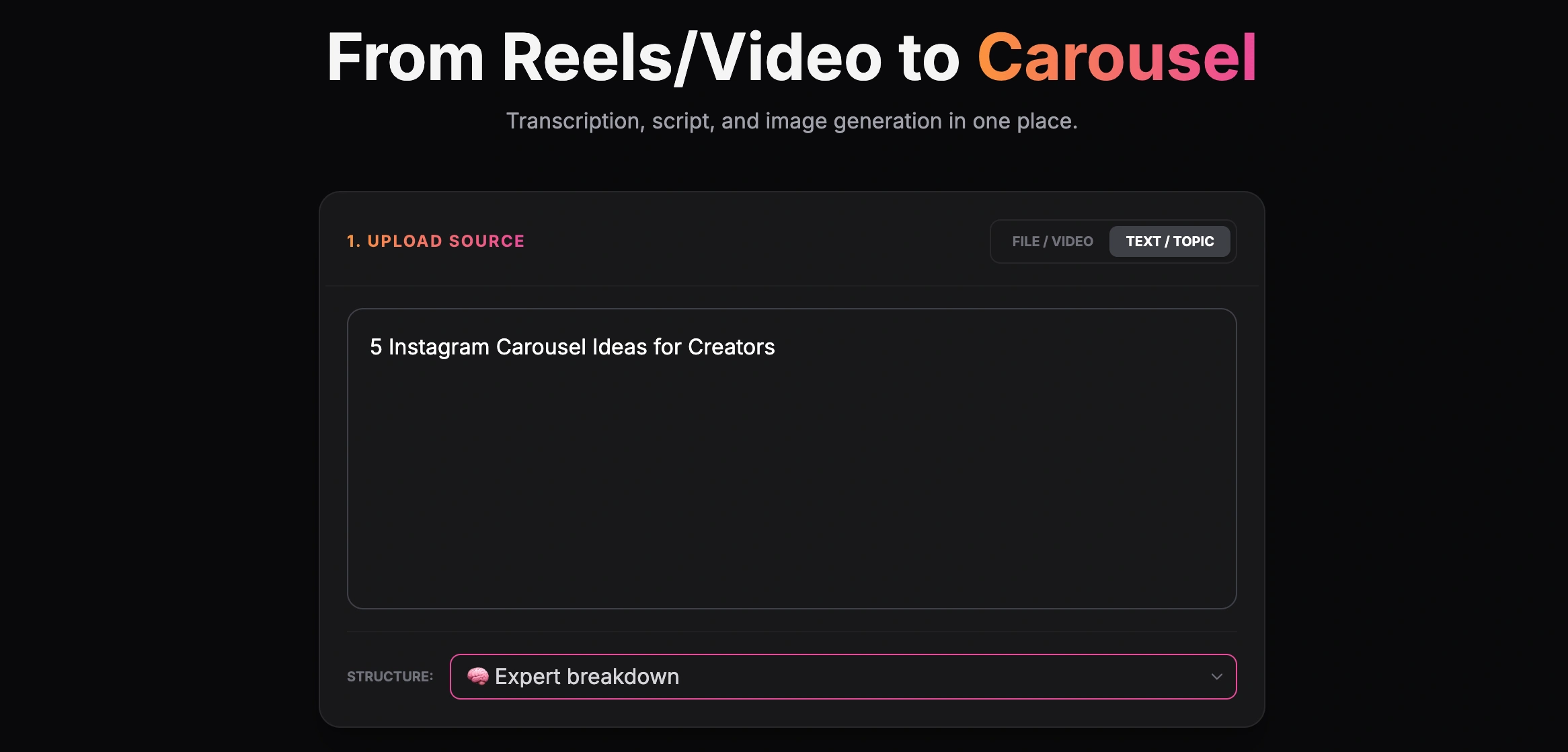
GoToFlow screen for creating a carousel from a text topic

Creating a carousel from a text topic

The AI will automatically expand your idea into a logical sequence of slides, creating the hook, the educational body, and the call to action.

Review the formatting and style against your actual brand requirements before exporting.
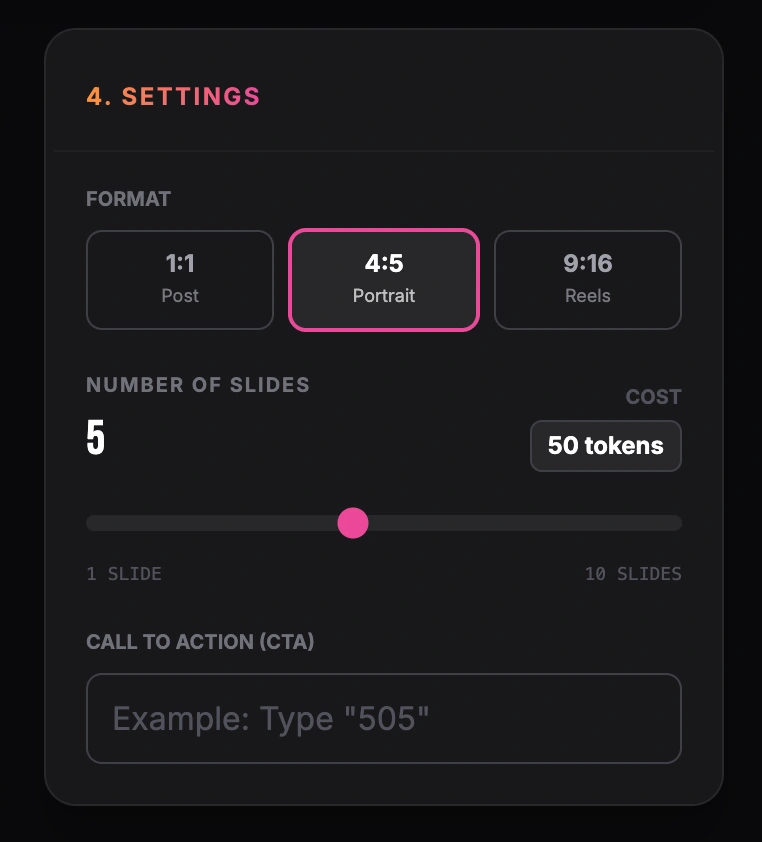
GoToFlow settings screen for 4:5 format, slide count and CTA

Setting format, number of slides and call to action

Preview the complete carousel, check its script and generated slides against the source, and revise or regenerate parts before downloading. Script revision and regeneration differ from editing individual text boxes in a generated image; inspect the actual workspace controls before planning those changes.
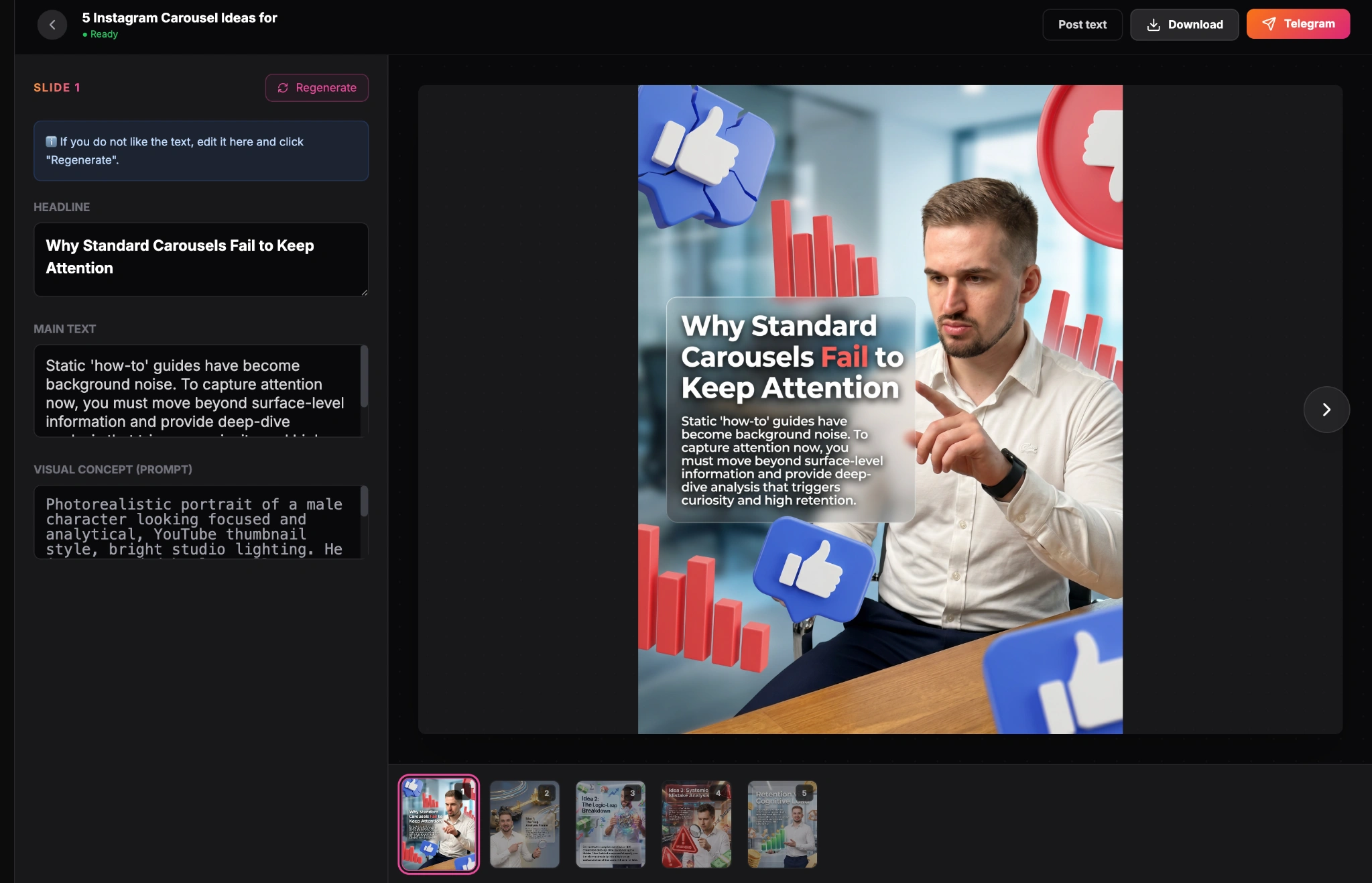
GoToFlow carousel editor showing a finished Instagram carousel result

Finished carousel result inside the GoToFlow editor

Conclusion

Finding good Instagram carousel ideas is easy when you stop relying on random inspiration and start using structured frameworks. By combining repeatable formats with AI generation tools, you can fill your content calendar and focus on growing your audience.

Workflow

Step-by-step phases

Phase 1Choose a framework
1

Educational

Teach your audience how to achieve a specific result.

2

Contrarian

Challenge a popular belief in your industry.

Phase 2Turn the idea into content
1

Outline the slides

Structure the idea into a Hook, Body, and CTA.

2

Generate the carousel

Let GoToFlow turn your idea into finished slides, automatically adapting the copy and layout — no manual slide assembly needed.

PROMPT LIBRARY

Reusable prompts

Act as an expert content strategist. Give me 5 Instagram carousel ideas for a [Your Niche] account. For each idea, provide a catchy headline and a brief outline of the 5 slides. Ensure the ideas focus on actionable value.
Formats

Useful article formats

The 'X vs Y' Comparison

Compare a common method with a better alternative.

Example: Manual Design vs AI Generation

The Industry Myth

Debunk bad advice that your audience frequently hears.

Example: Why posting every day is actually hurting your reach

Explore more

Related tools and guides

FAQ

Frequently asked questions

How many slides should a carousel have?

Choose the number of slides from the idea and the evidence it needs. Remove repeated points and check the complete sequence on a phone; this article does not establish a high-performing 5–8-slide range.

What is the best way to come up with ideas?

Look at the most common questions your clients or followers ask you. Every FAQ is a potential carousel idea.

Can I repurpose my blog posts into Instagram carousels?

Yes, converting blog posts into carousels is a great way to generate content ideas. You can extract the main headings and key takeaways to create educational slides.

What if I don't have any design skills to create carousels?

You don't need to be a designer. You can use an AI carousel generator that automatically applies proven layouts and typography to your text.

Should I use photos or text for my carousel ideas?

Choose a format that explains your material: a process, checklist, comparison, or story. Test it with your audience and compare relevant results; this guide does not establish one best-performing format.

Turn your idea into a carousel

Use GoToFlow to turn an idea, link, or source into structure, slide copy, visual design, CTA, and a ready-to-publish Instagram carousel for export.

Start Creating

Free to try — No design skills needed

Explore features →